Free tool

Passport Photo Maker

Turn a selfie into a clean ID photo with our passport photo maker, then download a ready-to-print or digital file.

★★★★★ 4.8 · loved by 2M+ creators
Free to tryCompliant photoHD on sign-in
2 × 2 in (51 × 51 mm)
38+ countries · checked against official rules — or it's free
Print & digital · official sizes

Why us

Better photos without the usual hassle

You get clean, natural-looking results from one simple photo toolkit you can use right in your browser.

Get a polished result fast

You can fix common photo problems without spending a long time learning new software. MiFoto keeps the process light, so you can move from a rough photo to something ready to print, post, or share.

Keep edits looking natural

Your photo should still look like your photo after editing. MiFoto is built for clean, believable results, so skin, color, lighting, and detail stay realistic instead of looking heavy, fake, or overprocessed.

Handle more than one photo problem

Most photos need more than a single fix. MiFoto helps you clean up distractions, improve quality, refresh older images, and create new visuals in one place, so you do not have to bounce between separate apps.

Start free and keep costs low

You do not need expensive editing software for everyday photo tasks. MiFoto gives you a practical way to improve personal photos, portraits, and product shots without committing to a complicated desktop setup.

Learn more

What this passport photo maker does

These topics show how to turn a normal photo into a passport-style image, what output you get, and what details matter before you download and print.

passport photo maker — topic section inline 0

ID photo maker from one upload

An ID photo maker should take you from one photo to a clean document image fast. Upload a front-facing photo, keep your head centered, and let the tool crop and clean the background. You get a photo formatted for document use instead of a casual selfie. If you need help before shooting, see how to make a passport photo at home for simple setup tips.

Man centered for a clean passport picture

Passport picture options that fit the job

A good passport picture starts with the right framing, face position, and background, not filters or style effects. This page focuses on a neutral, clear document photo, while the tool helps you adjust the image into a more usable format. Check passport photo requirements before you download so your photo matches the size and layout you need.

passport photo maker — topic section inline 2

Passport photo online without editing skills

Using a passport photo online tool is easier when everything happens in your browser. You do not need Photoshop, manual cutouts, or special printing software to make a clean document photo. If your wall is messy, a background remover can help create a plain backdrop first. For basic cleanup and better framing, this tool keeps the process simple for beginners.

Before photo with cluttered background for passport use

Free passport photo maker with a clear result

A free passport photo maker is useful when it gives you a real file you can save and print. The result should be a cropped photo with a plain background and document-friendly framing, not just a preview. If your original shot is dim or slightly rough, photo editing tips for beginners can help you improve it before upload. The result is most helpful when the before-and-after difference is easy to see.

passport photo maker — topic section inline 4

What makes a home photo work

The best source photo is bright, straight, and simple. Face the camera, keep your expression neutral, and avoid heavy shadows across your eyes or cheeks. A plain wall helps, but even a busy room can still work if you are clearly separated from the background. Small fixes to light, crop, and background usually matter more than using an expensive camera.

How it works

Make your passport photo in 3 steps

Upload a clear portrait, fit it to the photo frame, then download a ready file for digital use or printing.

Unedited portrait photo taken at home for an ID picture
1

Step 1: Upload a straight, clear portrait

Start with one photo where your face is fully visible and you are looking at the camera. A simple phone photo works well if your expression is neutral and the lighting is even.

Portrait centered with a clean plain background for document photo use
2

Step 2: Center your face and clean the background

The tool places your head in the right area of the frame and removes distractions behind you. You get a neat portrait with a plain background and proper head-and-shoulders crop.

Printed sheet and single trimmed passport-style photo on a table
3

Step 3: Download the finished photo files

Save a single passport-style photo for digital use, plus a print sheet with multiple copies on one page. A casual home snapshot becomes a clean headshot that is ready to print, trim, and submit where a passport or ID photo is needed.

Use this passport photo maker for common document needs

Use it to turn a casual portrait into a clear, properly framed photo for passports, visas, permits, school IDs, and other official forms.

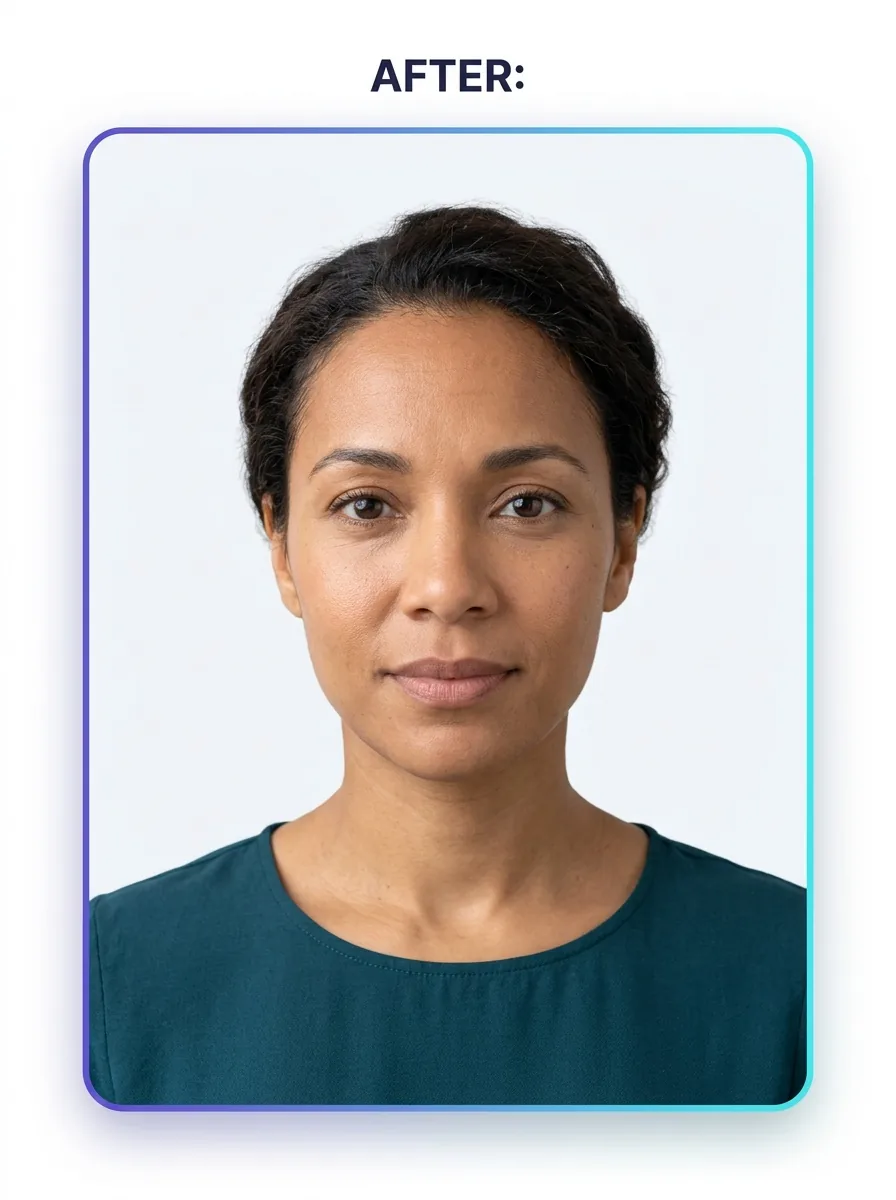
Finished passport-style photo of a woman on a clean white background

Travelers who need a passport photo maker online

This is for people who need a passport-style photo before an application or renewal. You upload one face photo and get a document-ready image you can save, print, or send with your paperwork after checking your local requirements.

Finished child ID photo with a simple clean background

Parents making ID photos for kids

This helps parents turn a home snapshot into a usable child photo without learning editing software. A passport photo creator is handy when your child will not sit still for long, because you can start with the best shot you already have.

Formal headshot style photo of a man with a clean white background

Students and workers updating formal photos

This is a simple fit for people who also need a neat face photo for forms, badges, or school records. A passport picture maker can give you a clean base image before you fine-tune it with portrait retouching or more background cleanup.

Features

What this passport photo maker helps you fix before you download

You get a photo sized and cleaned up for ID use, with help for cropping, background cleanup, and a plain result that is ready to save.

Face framing and crop guides

Get a photo that fits passport rules faster with built-in framing help. The tool centers your face, keeps the head size consistent, and crops the photo to a clean ID-style layout without making you guess the spacing.

Plain background cleanup

Turn a busy wall or home background into a clean passport-ready backdrop. If you need extra help isolating the subject, use the background remover first.

Natural light and skin correction

Fix dark shadows, uneven light, and small skin distractions while keeping the photo natural. For extra cleanup on a selfie or headshot, the photo retoucher can smooth blemishes before you export the final image.

Standard photo sheet export

Download the output you need, not just a preview. The tool creates a single cropped passport photo plus a printable sheet with multiple copies, so you can save a digital file or print the same photo at home or at a shop.

Background replacement control

Swap the original scene for a simple light background that looks clean and consistent. This gives you another way to build a neat backdrop before you save your final passport picture.

By the numbers

Trusted for fast photo fixes every day

People use MiFoto to clean up backgrounds, sharpen photos, and make polished images without a complicated editor.

5M+

Photos edited

Edits made by people like you

2M+

Happy creators

Everyday people editing without Photoshop

4.8★

App rating

Loved by our community

Create a passport-style photo from your own picture

Upload your photo, fit it to the right crop, and get a ready image file for digital use or printing.

Built for passport photo sizing
Simple crop and background cleanup
Download a finished photo you can save or print

Passport photo maker questions, answered

How does a passport photo maker work?
A passport photo maker turns your uploaded photo into a passport-ready image by helping you crop the right size, center your face, and clean up the background. You upload one photo, adjust it if needed, and download a finished file you can print or save for online forms.
Can a passport photo maker create a photo I can print at home?
Yes, a passport photo maker can create a file you can print at home if your printer and paper quality are good. You usually get a digital passport photo sheet or single image, then print it at the required size for your application.
Can I make a passport photo online from a phone picture?
Yes, you can make a passport photo online from a clear phone photo if your face is well lit and fully visible. Start with a plain background when possible, avoid heavy shadows, and check your country's rules before you submit the final photo.
What should an ID photo maker fix before I download my file?
An ID photo maker should help with crop, head position, background cleanup, and basic lighting correction before download. It should not change your facial features. The goal is a clean, natural photo that matches official photo rules as closely as possible.
Is there a free passport photo maker for basic edits?
Yes, a free passport photo maker is useful for basic edits like cropping, background cleanup, and simple touch-ups. It is best for creating a usable starting file. If you need exact country rules, read the guide on passport photo requirements before you submit.
What file do I get from a passport photo maker online?
You usually get a downloadable photo file, such as JPG or PNG, and sometimes a print sheet with multiple copies on one page. A passport photo maker online should give you the finished image, not just a preview, so you can print it or upload it.
Can a passport picture be edited if the background is messy?
Yes, a passport picture can often be improved if the main problem is a cluttered background. You can clean it up, then use a background remover for a plain cutout. For other personal photo uses, you can also try a simple generated background.
What if my photo looks too dark or my skin looks uneven?
You can fix that with light retouching, but keep the result natural. Use a photo retoucher to soften harsh lighting or small blemishes without changing your real appearance. If you want simple tips first, see the beginner photo editing tips article.
Can a passport photo creator fix blur, or do I need a new photo?
A passport photo creator can improve mild softness, but a heavily blurred photo usually needs to be retaken. If the image is only slightly soft, sharpen it carefully and keep details natural. For a step-by-step home setup, check the article about making a passport photo at home.
What should I do after I make my passport photo file?
Download the final file, then check the size, background, and face position against your application rules. If the image still needs cleanup, adjust the crop or background before you save the final version.

Create a passport-style ID photo from any clear portrait

Upload a photo, crop it to the right format, and get a clean passport-ready image you can download.

  • Works in your browser
  • Simple for first-time photo editing
  • Download a clean photo file when you are done
Clean passport style photo on a white background

Explore more